
01 · Service knowledge
Technician assistant
Retrieve relevant manuals, service bulletins and repair history in machine context. Give technicians cited reference material and a route to OEM specialists.
For equipment OEMs & dealer networks
Your network’s knowledge. In the hands of every dealer.
Help technicians, parts teams and dealer support find cited answers across your systems. Connect the context. Respect the permissions. Keep people in control of consequential actions.
One governed service layer
Technician
Manuals · bulletins · repair history
Parts
Catalogs · machine context · availability
Dealer support
Policy · warranty · service questions
Policy-aware multi-agent orchestration
Retrieve → ground → cite → route for review
Permissions · Approvals · Audit trail
Built for North American dealer networks and global OEM standards.
Strategy → Integration → Governed AI → Operations
Three roles. One governed foundation.
Not another place to search. A service layer that brings the right knowledge and system context into technician, parts and support workflows.
01 · Service knowledge
Retrieve relevant manuals, service bulletins and repair history in machine context. Give technicians cited reference material and a route to OEM specialists.
“Which bulletins and past repairs are relevant to this machine’s warning?”
Uncertainty or safety-critical guidance → escalate to a qualified specialist.
02 · Parts & availability
Bring catalogs, product and machine context together with stock and order data. Help parts teams compare candidates and prepare an order for review.
“What catalog options and stock should I review for this machine?”
Fitment needs verification. Consequential orders require authorized confirmation.
03 · Policy & warranty
Answer policy, warranty and service questions from approved sources. Route the request or prepare a case with the context a human reviewer needs.
“What information is needed before this warranty case can be reviewed?”
Prepare and route the case. Warranty decisions remain with authorized people.
From question to review
The assistant brings evidence together, shows what it can and cannot establish, and prepares the handoff. It does not make the safety decision.
01 / Resolve context
Dealer technician
Assigned machine · own dealer’s repair records · OEM-approved technical documents
02 / Retrieve evidence
Other dealers’ records and restricted OEM data are excluded.
Dealer technician asks
“A hydraulic warning returned after service. Which references and history should I send to OEM support?”
03 / Cited response
Include the applicable manual and bulletin references [1, 2], along with the authorized repair history [3]. The prior warning report is context, not proof of a cause.
I cannot confirm safe operation or prescribe a repair. A qualified OEM specialist needs to review the machine context and evidence.
04 / Specialist review required
A support-case draft can be prepared with these sources. The technician reviews it before submission; safety-critical guidance is escalated to an authorized specialist.
Question, source access, draft and review decision captured in the audit trail.
Connected, not replaced
FlowCore connects knowledge, structured data and live context through governed multi-agent orchestration. Start with the sources your use case needs—not every system at once.
Manuals, bulletins, documents and policies. Retrieve the relevant approved content and cite it.
Warehouses and lakes, product and parts master data, service history and warranty records.
ERP, DMS, warranty / claims, SaaS / CRM including Salesforce, and ITSM workflows.
Telemetry and live event streams add machine context where access and data readiness allow.
Assess quality, lineage and lifecycle; align master data and cataloging. Keep source ownership, document revisions and machine applicability visible.
Architecture to fit your environment
Cloud architecture across AWS, Azure and GCP; own-cloud deployment offering.
Control is part of the service
Define who can see, ask and act before the pilot. Enterprise authentication, WAF protection and audit trails support the boundaries you agree with your teams.
OEM, dealer and customer boundaries with enterprise authentication and role-based access. Retrieval is limited to authorized sources.
Citations, document context and audit trails make answers reviewable. Missing or conflicting evidence triggers escalation—not false certainty.
Configurable escalation and human approval separate an answer or draft from an order, a claim decision or safety-critical guidance.
FlowCore AI’s company management systems are certified for software development and implementation.

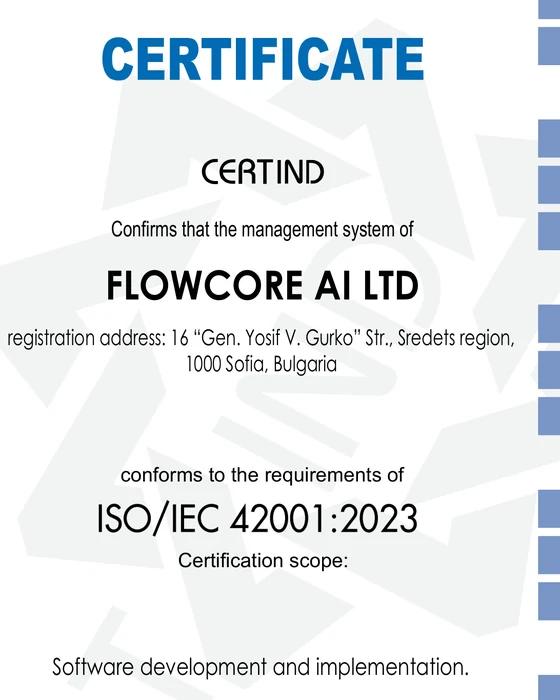
These certifications apply to FlowCore AI’s management systems—not to individual answers, agents or your deployment.
Start narrow. Prove the value.
Begin with the workflow that matters most. Each stage has its own scope and output, with data access, oversight and success criteria agreed before rollout.
01 · 45 minutes
Identify the service or parts bottleneck, business owner and candidate dealer group. Decide whether there is a fit.
You receive
A focused problem and an agreed next step
02 · 2–4 weeks
Agree one high-impact use case, data readiness and access, permissions, integrations and baseline KPIs.
You receive
A roadmap, business case and scoped pilot plan
03 · 3–6 months
A fixed-price pilot / POC with a small dealer group. Integrate, evaluate with subject-matter experts and roll out under supervision.
You receive
A supervised pilot, evaluation and scale decision
A business sponsor, dealer champions and subject-matter reviewers; representative documents and questions; system and security owners to agree access and permissions.
A governed integration and assistant workflow, an evaluation set, approval and escalation rules, dealer enablement, and a review of evidence against baseline KPIs.
Evidence before expansion
Baseline the selected KPIs during assessment. Evaluate them through the pilot alongside expert review, rather than assuming an improvement.
Compare search and response time with the baseline.
Review evidence quality, applicability and missing sources.
Track handoffs, review outcomes and repeat use by dealers.
Evaluate first-time fix rate, parts availability or warranty cycle time, as relevant.
Measures to baseline and evaluate—not achieved results. Scale decisions depend on the evidence, readiness and agreed risk controls.
Practical questions
A useful first conversation starts with your systems, your people and your boundaries.
No. Start with a bounded use case and representative sources. The assessment checks document quality, revisions, machine context and access, then identifies the readiness work needed for the pilot.
Yes. The service connects to existing ERP, DMS, warranty / claims, CRM and ITSM environments. Specific interfaces, data access and integration effort are agreed during assessment.
FlowCore offers own-cloud deployment and cloud architecture services across AWS, Azure and GCP. The deployment design is agreed for your security, integration and operational needs—not a one-size-fits-all matrix.
Define OEM, dealer and customer roles, source entitlements and enterprise authentication up front. Retrieval and proposed actions follow those permissions, with source access and activity recorded for review.
Safety-critical or uncertain guidance is escalated to qualified specialists. Orders, claim decisions and other consequential actions require the authorization you define. Answers and drafts are distinct from approved execution.
Review the agreed baseline KPIs, answer grounding, source coverage, escalation and adoption with your experts. Evaluate workflow outcomes and readiness, then make a joint scale, refine or stop decision.
Start with one dealer workflow
In a 45-minute discovery call, we’ll map the bottleneck, the sources and the people involved. If there’s a fit, the next step is a 2–4 week assessment—not a promise to skip the groundwork.